
Salesforce launched Salesforce Go during the Winter 25 release to bring order to how complex Salesforce products enter an organisation. Basically, cloud portfolios kept expanding across revenue, service, data, and AI. Feature activation across Setup, licenses, and documentation created confusion and risk.
Therefore, Salesforce introduced Salesforce Go to provide one controlled path for discovery, activation, configuration, and governance. Salesforce Go defines which Revenue Cloud capabilities appear, the order of activation, the dependencies between engines, and the access and licensing model.
Revenue Cloud only becomes a reliable revenue platform if Salesforce Go effectively controls how each capability enters the Salesforce org.
This guide explains how Salesforce Go structures Revenue Cloud Advanced, how feature sets and features should become active, and how organisations move from licensed modules to a stable, enterprise grade revenue system with confidence. All backed by official Salesforce insights.
Free Download: CPQ to RCA Migration Guide for C-Suite Leaders
What is Salesforce Go and how it controls Revenue Cloud activation?
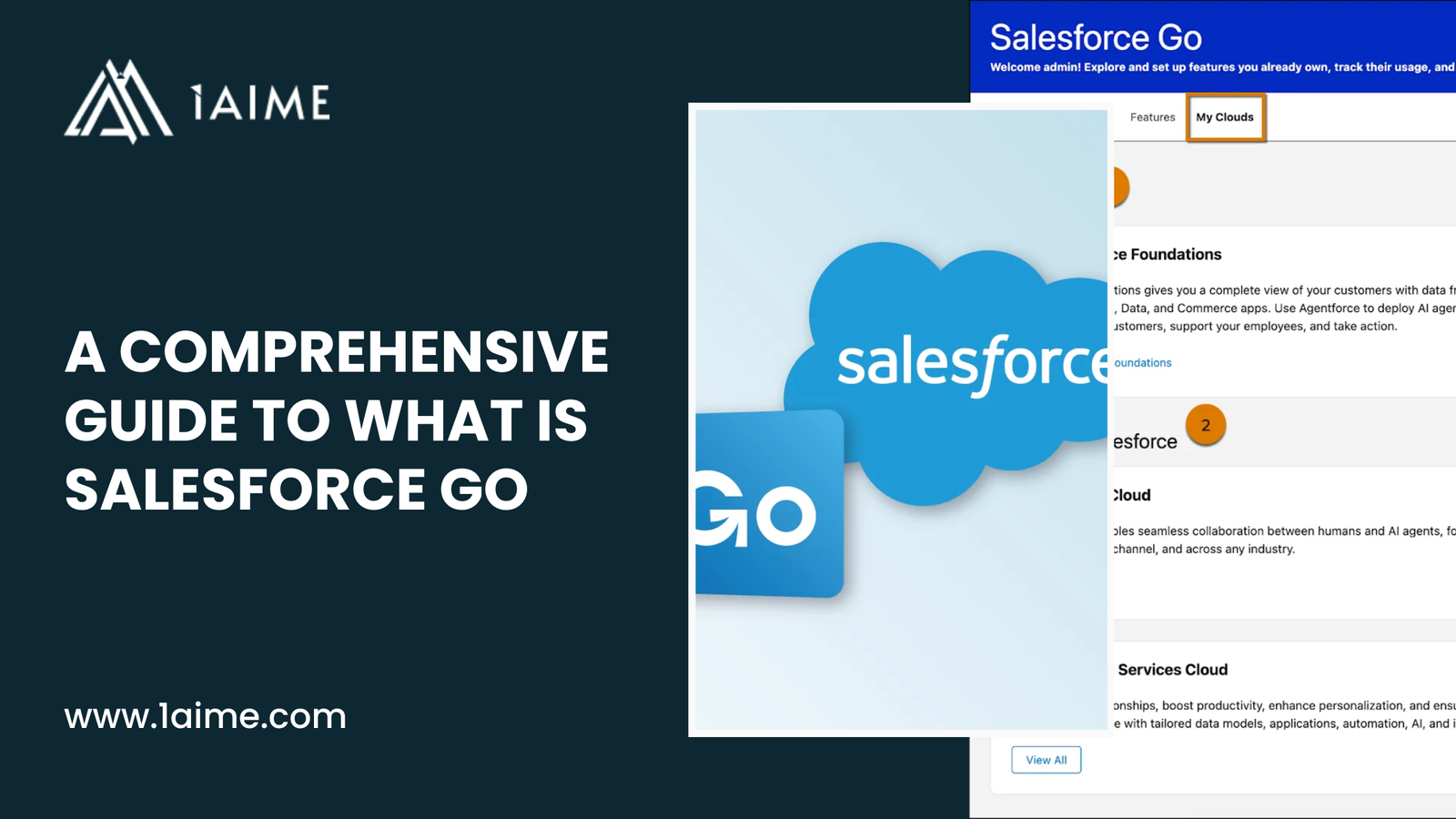
Salesforce Go is the central enablement and governance platform that Salesforce provides to help organisations discover, activate, configure, and manage Salesforce features across the entire platform. Salesforce designed Salesforce Go to bring structure to how complex products get introduced into a Salesforce org so every capability enters the system in the correct order, with the correct dependencies, permissions, and licensing in place.
Salesforce Go turns Revenue Cloud Advanced from a collection of powerful modules into a governed operating environment for revenue.
Salesforce Go brings four essential capabilities into one workspace.
- Feature discovery. Salesforce Go shows every Revenue Cloud feature and feature set that the Salesforce edition and licenses support. Admins can see which RCA capabilities are available before any activation begins.
- Guided setup. Salesforce Go presents step by step setup journeys for every Revenue Cloud feature so configuration happens through a controlled flow rather than manual searching across Setup.
- Dependency control. Salesforce Go checks which Revenue Cloud components depend on each other and activates required foundations before advanced features become available.
- License and access governance. Salesforce Go tracks permission sets and permission set licenses for each Revenue Cloud feature so access and cost stay under control.
Why Salesforce uses Salesforce Go for Revenue Cloud?
Revenue Cloud Advanced runs the commercial engine of the business. Product catalogues, pricing rules, quoting, ordering, fulfilment, and billing all depend on shared data structures and execution logic. If you go for a random or unstructured activation of these components, it can create instability, revenue leakage, and operational risk.
Salesforce uses Salesforce Go to ensure Revenue Cloud features enter the organisation in a controlled sequence that matches how the revenue lifecycle works.
For example, a business that plans to sell configurable subscription bundles needs three things to exist before quoting begins. A structured product catalogue needs to exist. Pricing logic needs to exist. Configuration rules need to exist. Salesforce Go enforces this order by guiding admins to enable Product Catalog Management, Price Management, and Product Configurator in the correct sequence.
How Salesforce Go controls Revenue Cloud activation?
Salesforce Go controls RCA activation through a guided funnel called Get Started with Revenue Cloud.
Admins begin inside Salesforce Go by locating Revenue Cloud. Salesforce Go shows all available feature sets and features based on the organisation’s edition and licenses. Admins then select the Revenue Cloud capabilities that match the business model.
Each time a feature gets turned on, Salesforce Go checks three things.
First, Salesforce Go verifies licensing and edition eligibility so only supported RCA capabilities enter the org.
Second, Salesforce Go validates technical prerequisites so dependent components become available before the feature becomes usable.
Third, Salesforce Go opens the configuration path so admins complete the setup that turns a feature into an operational revenue engine.
For example, an organisation that enables Quotes through Salesforce Go receives the required objects, metadata, and setup screens. Salesforce Go then directs the admin to assign permission sets to sales users and expose quote components on Lightning pages. This ensures sales teams receive a working quoting environment rather than a partially enabled feature.
Salesforce Go also tracks which users hold Revenue Cloud permission sets and how many licenses remain available. This allows leadership teams to control access, forecast cost, and maintain compliance as RCA expands across the organisation.
Salesforce Go therefore acts as the activation engine, configuration guide, and governance layer for Revenue Cloud Advanced. Revenue Cloud becomes an enterprise grade revenue system through this structure rather than a collection of disconnected tools.
Also Read: Salesforce Revenue Cloud Limits Your Org Should Know Before Deployment
How Salesforce Go structures Revenue Cloud into feature sets and features?
Salesforce Go organises Revenue Cloud Advanced using a two-layer architecture that separates business goals from technical capabilities. This structure allows leadership teams and administrators to activate RCA in a way that reflects how revenue operations work rather than how software components happen to exist.
The first layer consists of Feature Sets to represent business-level revenue functions. Each feature set groups multiple capabilities that work together to achieve a specific commercial outcome.
Salesforce provides 3 Revenue Cloud feature sets, which acts as a blueprint for how Revenue Cloud should support a specific part of the revenue lifecycle.
- Manage Sales Transactions. This feature set supports how deals move from quote to order to asset. It includes the engines that control quoting, ordering, amendments, renewals, and asset lifecycle.
- Design Product Catalogs. This feature set governs how products, bundles, attributes, and discovery logic are structured. It defines what sales teams can sell and how offerings are organised.
- Manage Pricing. This feature set controls how prices get calculated. It includes price procedures, pricing logic, and rate management for both subscription and usage-based models.
The second layer consists of Features, which represent the actual Revenue Cloud engines that execute the work defined by each feature set.
Revenue Cloud provides the following features inside Salesforce Go.
- Product Catalog Management controls products, attributes, categories, and bundles.
- Product Discovery controls how users find and filter products during selling.
- Product Configurator controls eligibility, compatibility, and guided selling rules.
- Price Management controls pricing procedures, elements, and price calculation.
- Quotes controls deal creation and pricing execution.
- Orders controls contract creation and order submission.
- Asset Lifecycle Management controls amendments, renewals, and ongoing customer entitlements.
Salesforce Go links feature sets to features through dependency logic. For example, Design Product Catalogs connect to Product Catalog Management, Product Discovery, and Product Configurator. Manage Pricing connects to Price Management. Manage Sales Transactions connects to Quotes, Orders, and Asset Lifecycle Management.
This structure ensures Revenue Cloud grows in a controlled way. Leadership teams select feature sets based on how the business sells. Salesforce Go then exposes the correct technical features that bring those business models to life.
Salesforce Go therefore provides a business-first map of Revenue Cloud Advanced rather than a technical checklist. Revenue operations become easier to design, activate, and govern because every feature aligns to a clear commercial purpose.
Also Read: What is the Cost of Ignoring Revenue Cloud (RCA) Limits During Implementation?
How to access Salesforce Go and locate Revenue Cloud in your Salesforce org?
Salesforce Go operates through Salesforce Setup and provides the controlled entry point for Revenue Cloud Advanced enablement. Access begins through the admin interface that governs security, data, and configuration so every Revenue Cloud action remains under platform governance.
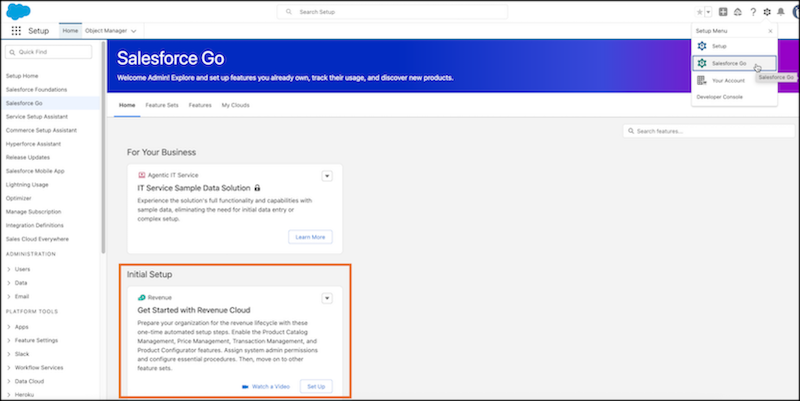
Step 1. Open Salesforce Setup
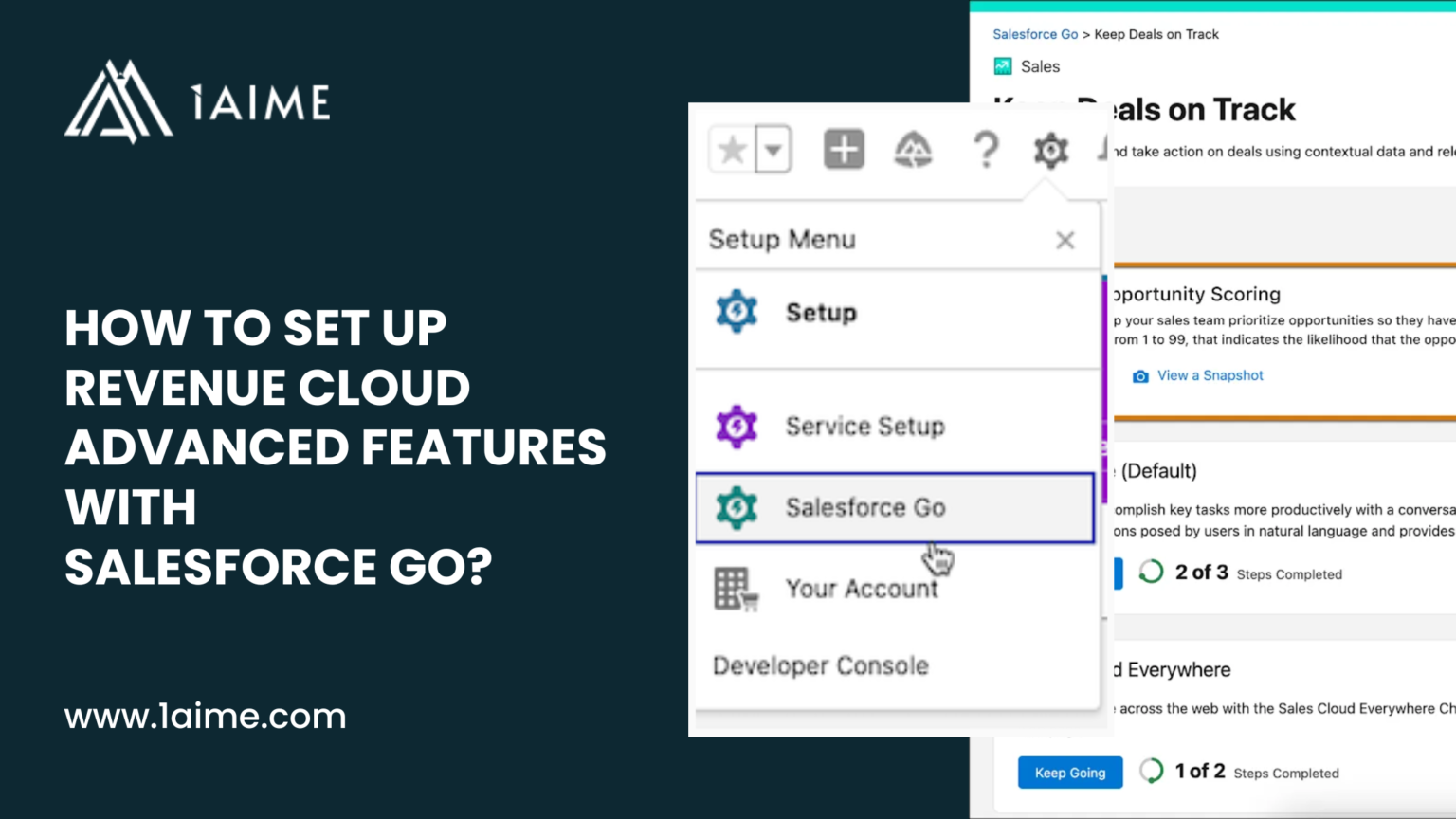
Log in to Salesforce using Lightning Experience. Select the gear icon at the top right of the screen. Choose Setup to open the administration workspace.
Step 2. Open Salesforce Go
Locate Salesforce Go within the Setup menu. Select Salesforce Go to open the feature discovery and activation workspace.
Step 3. Open the Home tab
Salesforce Go opens on the Home tab. The Home tab presents all available products and feature sets based on the Salesforce edition and active licenses for the org.
Step 4. Search for Revenue Cloud
Use the search field within Salesforce Go. Enter Revenue Cloud. Salesforce Go returns the Revenue Cloud setup entry from feature names and descriptions.
Step 5. Select Get Started with Revenue Cloud
The Home tab displays a card labeled Get Started with Revenue Cloud under Initial Setup. Select the card to open the Revenue Cloud activation workspace.
Step 6. Review Revenue Cloud readiness
Salesforce Go displays the Feature Sets and Features that Revenue Cloud Advanced supports for the org. The screen confirms availability for Product Catalog Management, Pricing, Quotes, Orders, and related RCA capabilities.
The process moves the Salesforce org from general administration into the guided Revenue Cloud enablement flow. From that point forward, every RCA feature, permission assignment, and configuration step runs through Salesforce Go.
How to use feature sets and activate Revenue Cloud Advanced features?
Salesforce Go provides one continuous activation path for Revenue Cloud Advanced. Feature sets define the commercial structure. Features bring the execution engines online. Both layers work together to transform Revenue Cloud from a licensed product into a working revenue system.
Feature sets appear first and establish how the business sells. The Features tab then exposes the actual Revenue Cloud engines that perform quoting, pricing, configuration, and transaction management.
Step 1. Open the Feature Sets tab
- Open Salesforce Go from Setup
- Select the Feature Sets tab
- Apply the Revenue Cloud filter
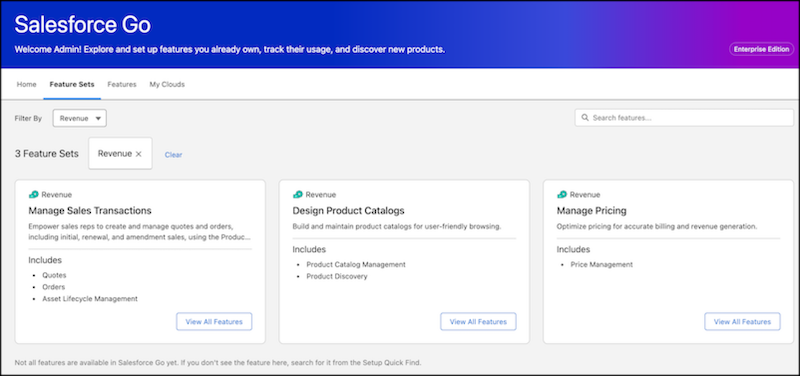
Step 2. Enable Design Product Catalogs
- Select Design Product Catalogs
- Select Set Up
- Allow Salesforce Go to enable catalogue and discovery foundations
Step 3. Enable Manage Pricing
- Select Manage Pricing
- Select Set Up
- Allow Salesforce Go to validate pricing prerequisites
Step 4. Enable Manage Sales Transactions
- Select Manage Sales Transactions
- Select Set Up
- Confirm availability of Quotes, Orders, and Asset Lifecycle Management
Step 5. Review feature set readiness
- Confirm each feature set shows an active status
- Resolve any prerequisite prompts shown by Salesforce Go
Step 6. Open the Features tab
- Select the Features tab
- Apply the Revenue Cloud filter
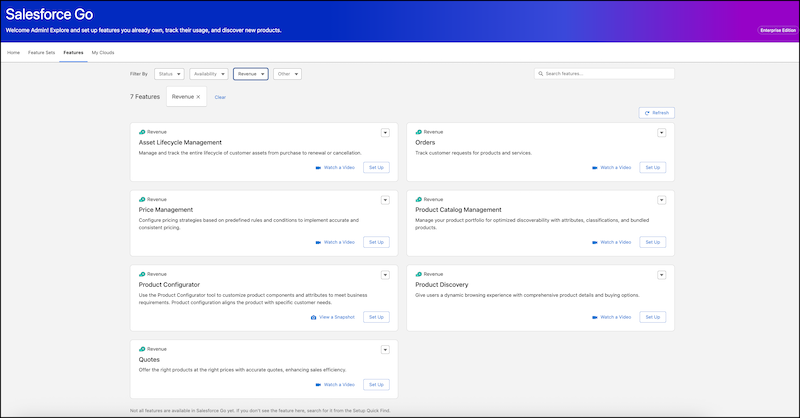
The operational engines for Revenue Cloud now appear.
- Product Catalog Management
- Product Discovery
- Product Configurator
- Price Management
- Quotes
- Orders
- Asset Lifecycle Management
Step 7. Activate Product Catalog Management
- Select Product Catalog Management
- Select Set Up
- Accept the feature terms
- Allow Salesforce Go to create catalogue objects and metadata
Step 8. Activate Product Discovery
- Select Product Discovery
- Select Set Up
- Allow Salesforce Go to validate catalogue readiness
Step 9. Activate Product Configurator
- Select Product Configurator
- Select Set Up
- Allow Salesforce Go to prepare configuration rules and engines
Step 10. Activate Price Management
- Select Price Management
- Select Set Up
- Allow Salesforce Go to prepare pricing procedures and data structures
Step 11. Activate Quotes
- Select Quotes
- Select Set Up
- Assign required permission sets when prompted
Step 12. Activate Orders
- Select Orders
- Select Set Up
- Confirm order and asset objects become available
Step 13. Activate Asset Lifecycle Management
- Select Asset Lifecycle Management
- Select Set Up
- Allow Salesforce Go to enable renewal and amendment controls
This flow ensures that product structure, pricing logic, and transaction execution enter the Salesforce org in a controlled sequence that supports stable quoting, contract management, and revenue operations at scale.
Also Read: Is Your Business RCA-Ready? 5 Questions to Ask Before Migrating from Salesforce CPQ
How Salesforce Go manages prerequisites and dependencies between features?
Salesforce Go controls Revenue Cloud Advanced through a readiness model that evaluates every feature before activation. Each Revenue Cloud engine depends on other engines, licenses, and user access. Salesforce Go verifies all of these so every feature enters the org in a usable, supported state.
Revenue Cloud runs as one connected system. Product data feeds pricing. Pricing feeds quoting. Quoting feeds orders, assets, and billing. Salesforce Go enforces that chain through prerequisite control.
What Salesforce Go checks before allowing a feature to turn on?
When a Revenue Cloud feature is selected on the Features tab and setup begins, Salesforce Go evaluates three dependency layers.
Platform dependencies. Salesforce Go checks whether required Revenue Cloud features already operate. Product Configurator depends on Product Catalog Management and Product Discovery. Price Management depends on product and attribute structures. Quotes depend on pricing and catalogue data. Orders depend on Quotes and pricing. Salesforce Go verifies that each foundation exists before allowing activation to continue.
License dependencies. Salesforce Go checks whether the org owns the required permission set licenses for the feature. When additional entitlements are required, Salesforce Go presents purchase or account options through the Your Account app before setup can continue.
Access dependencies. Salesforce Go checks whether the required permission sets exist and can be assigned. Setup and usage both depend on these permissions. Salesforce Go exposes the permission assignment step directly on the feature page so access remains aligned with activation.
How Salesforce Go shows and resolves prerequisites?
Each Revenue Cloud feature includes a feature detail page inside Salesforce Go. That page displays:
- automated prerequisites that Salesforce Go enables
- manual prerequisites that require action
- license requirements
- access requirements
Every dependency includes a direct path for resolution. Required features can be turned on. Licenses can be added. Permission sets can be assigned. All actions stay inside the same Salesforce Go workflow.
For example, Product Configurator relies on a structured product catalogue and discovery layer. Salesforce Go blocks Product Configurator until Product Catalog Management and Product Discovery become active. Once those engines exist, Salesforce Go allows configuration rules to become available.
For example, Quotes require Price Management and Product Catalog Management. Salesforce Go verifies both engines. Salesforce Go then checks that quote permission set licenses exist and that access can be assigned. Only after those conditions meet platform rules does quote setup and Lightning configuration become available.
Why this matters for Revenue Cloud stability?
Revenue Cloud Advanced supports complex enterprise revenue models. Partial activation creates pricing errors, quoting failures, and billing risk. Salesforce Go prevents that outcome by enforcing dependencies before every feature becomes operational.
Salesforce Go keeps Revenue Cloud aligned with the revenue lifecycle so catalogue, pricing, transactions, and lifecycle management always operate as one connected system.
How to use Salesforce Go feature resources for enablement and alignment?
Salesforce Go places enablement directly inside the activation workflow so every Revenue Cloud Advanced feature can be understood, validated, and shared before configuration moves forward. Feature resources allow teams to review what a capability does, confirm how it fits the revenue model, and align stakeholders before the feature becomes active.
Salesforce Go supports this alignment through guided actions rather than scattered documentation.
When planning Revenue Cloud scope
Start inside Salesforce Go on the Feature Sets or Features tab.
- Open a Revenue Cloud feature or feature set
- Review the feature description to understand business purpose
- Open the guided tour to see how the feature behaves inside Salesforce
- Review linked Salesforce Help articles to confirm technical scope
Use this review to decide whether the feature belongs in the current Revenue Cloud rollout.
When validating readiness with Sales, Finance, or RevOps
Use the built in sharing tools.
- Open the feature or feature set page
- Select Copy Details
- Paste the copied content into internal documents or messages
Stakeholders receive the same feature description, tours, videos, and help links that appear inside Salesforce. That keeps commercial, finance, and operations teams aligned on how Revenue Cloud will operate.
When configuration work begins
Use the feature resources as part of setup.
- Open the feature detail page
- Review setup guidance and links
- Follow the configuration steps shown for that feature
- Refer back to help topics during configuration
Resources remain tied to the feature so configuration always follows the correct Salesforce guidance.
When user adoption and training starts
Return to Salesforce Go for every active Revenue Cloud feature.
- Open the feature
- Use tours and videos to show how sales and operations teams will use the capability
- Share links to help articles for deeper training
Salesforce Go becomes the reference point for how Revenue Cloud actually runs in the org.
How to configure Revenue Cloud features after they are turned on?
Salesforce Go keeps feature activation and feature configuration connected. After a Revenue Cloud Advanced feature reaches the On state, Salesforce Go exposes the exact configuration steps required to make the feature usable across users and processes.
Use the Feature Detail page for each active Revenue Cloud feature.
Open the configuration workspace
- Open Salesforce Go from Setup
- Select the Features tab
- Apply the Revenue Cloud filter
- Select an active Revenue Cloud feature
Follow the setup steps
- Review the Setup section on the feature page
- Open each required configuration step in sequence
- Complete data, rule, and object configuration shown for the feature
Assign user access
- Locate Manage User Access on the feature page
- Assign required permission sets or permission set groups
- Confirm access for Sales, RevOps, and Operations teams
Expose the feature in the interface
- Locate the Lightning page configuration step
- Select Manage to open App Builder
- Add feature components, fields, or actions to relevant pages
Verify feature readiness
- Return to the feature page
- Confirm the feature shows Fully Configured
- Review any remaining setup prompts
Repeat for each Revenue Cloud feature
- Product Catalog Management
- Product Discovery
- Product Configurator
- Price Management
- Quotes
- Orders
- Asset Lifecycle Management
How to assign users and control access to Revenue Cloud features?
- Open Salesforce Go from Setup
- Select the Features tab
- Apply the Revenue Cloud filter
- Open the required Revenue Cloud feature
- Locate Manage User Access on the feature page
- Select Manage to open the permission assignment window
- Review the permission sets and permission set groups linked to the feature
- Select users who require access to the feature
- Assign the appropriate permission sets or groups
- Save the assignments
- Return to the feature page to confirm access status
- Repeat for each Revenue Cloud feature that requires user access
How to configure Lightning pages for Revenue Cloud components?
For instance, a SaaS organisation uses Revenue Cloud Advanced to sell subscriptions, add on services, and usage based products. Sales teams require a single workspace where products, pricing, and contract terms appear during deal creation. Salesforce Go provides the direct path to configure that experience.
- Open Salesforce Go from Setup
- Select the Features tab
- Apply the Revenue Cloud filter
- Open Quotes
- Locate the Lightning page configuration step
- Select Manage to open Lightning App Builder
- Select the Opportunity and Quote record pages
- Add Quote Line Editor, Pricing Summary, and Product Selection components
- Save and activate the updated pages
Sales teams can now see live pricing and product configuration during deal creation.
The same pattern applies to order and lifecycle management.
- Open Orders in Salesforce Go
- Select the Lightning page configuration step
- Add Order Details, Fulfilment Status, and Asset links to the Order record page
- Save and activate the page
Operations teams can now track fulfilment and customer entitlements from a single screen.
Quick Insights
Revenue Cloud Advanced becomes powerful only when every component enters the Salesforce org in the right order, with the right permissions, and with the right governance in place. Salesforce Go provides that control layer. Product structure, pricing logic, quoting, order processing, and lifecycle management all stay aligned because activation, configuration, access, and usage remain connected inside one guided system.
Salesforce Go turns Revenue Cloud from a collection of licensed modules into a controlled commercial platform. Every feature follows the same path from discovery to configuration to adoption. Ultimately, this consistency protects revenue, simplifies operations, and creates a foundation that scales with the business.
Here’s what you should validate before enabling Revenue Cloud features in Salesforce Go
- Product model clarity exists for how offerings, bundles, and attributes should be structured
- Pricing strategy aligns with how subscriptions, usage, and discounts should calculate
- Deal structure rules exist for quotes, orders, amendments, and renewals
- License capacity matches the number of users who require access
- Permission set strategy exists for Sales, RevOps, Finance, and Operations
- Lightning pages match how teams sell, contract, and fulfil
- Sandbox environment exists for solution bundle and feature testing
- Cross team alignment exists across Sales, Finance, Product, Legal, and IT
Salesforce Go provides the framework for RCA feature activation whereas leadership intent and operating model design determine the outcome.